Your rules, every session
The part that decides whether you can leave an agent alone with your repository: what git will let it do, set per project and carried into every session it starts.


- 01
The project explains itself, once
What the product is, what its pages do, the rules of the codebase, the things that are known to be broken. This is what the assistant reads when it turns somebody’s message into a ticket – so the work arrives already knowing where it lands.
- 02
The agent cannot push
On by default, per working folder. It is refused at every trust level and the agent is told so in its own instructions – with one named exception, written on the switch itself rather than discovered later.
app.bridge4.dev/development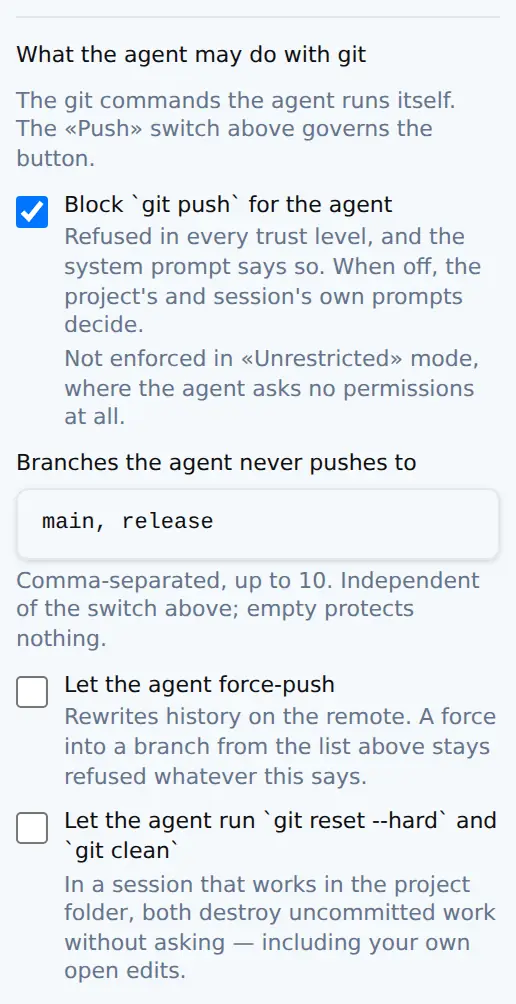
- 03
Branches it never pushes to
Same screen, next rule. `main` and `master` out of the box, and this list is independent of the switch above – turning the ban off does not unprotect them.
app.bridge4.dev/development - 04
Force-push and destructive git are separate
Two switches, both off, and deliberately not merged with anything else: one setting that means three things is a setting nobody can reason about.
app.bridge4.dev/development - 05
And how the commits should read
The convention and the language DevBridge writes commit messages in, and – the switch under them – whether the agent may commit on its own at all. That last one goes into the session with the rest of the policy. All three sit on the working folder, so a client’s repository and your own can disagree.
app.bridge4.dev/development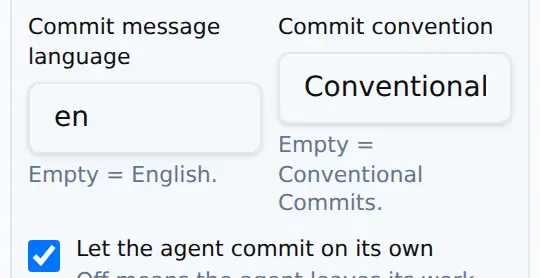
- 06
What comes back is reviewable
A session you can read from the first message, and the ticket it belongs to. You approve the work; you are not archaeologising it.

